TabSetControl
Tabs for extensive forms, nested across several levels if needed.
Adding the TabSetControl in 6 steps
The tour shows how the control element can be integrated into an existing application, even after the fact.
TabSetControl - Object
This tour demonstrates the use of the TabSetControl. In the course of it you will build a tab set that includes several JSP pages, one per tab. The TabSetControl works with or without server round trips. The number of visible tabs can also be limited; if there are more tabs than that, navigation elements appear. Scrolling through the tabs works without server round trips as well.
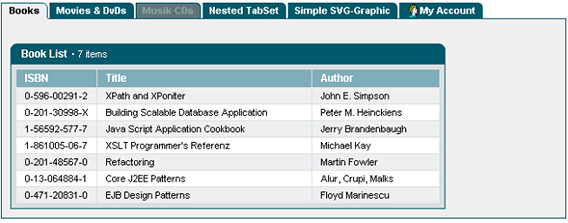
TabSetControl example
This is the tab set we are going to build:
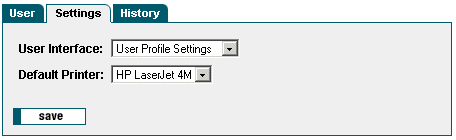
Using the TabSetControl takes the following steps:
- Choosing the design of the user interface
- Writing an action class that calls the JSP page
- Providing the display data for each tab
- Configuring the tab set within the JSP page
1. Registering the painter factory
The first step is to register the painter factory. It determines the design of the user interface. This can be done for the whole application in the init() method of the front controller servlet.1 Here we choose the standard design provided by the DefaultPainter.2
import javax.servlet.ServletExceptionimport org.apache.struts.action.ActionServlet;import com.cc.framework.ui.painter.PainterFactoryimport com.cc.framework.ui.painter.def.DefPainterFactory;import com.cc.framework.ui.painter.html.HtmlPainterFactory;public class MyFrontController extends ActionServlet { public void init() throws ServletException { super.init(); // Register all Painter Factories // with the preferred GUI-Layout // In this case we only use the Default-Layout. PainterFactory.registerApplicationPainter ( getServletContext(), DefPainterFactory.instance()); PainterFactory.registerApplicationPainter ( getServletContext(), HtmlPainterFactory.instance()); }}*1) If individual users are to choose between different interface designs, additional painter factories are registered in the user session. This is usually done in the LoginAction with PainterFactory.registerSessionPainter() in session scope.
*2) Further designs (painter factories) are part of the Professional Edition, or you develop your own.
2. Deriving the action class for the Struts adapter
In our example we want to build a tab set whose three tabs each include a JSP page. The tab set is to work without server round trips. That is the right choice whenever all the data to be presented can be provided at once and, as in our case, belongs together logically. For complex screens with heterogeneous content it is usually better to load the data only when the user switches to the tab in question.
In our case the action class "UserProfileEditAction" determines the display data. It is derived from the class FWAction, which wraps the Struts action class and adds the functions of the presentation framework. Instead of execute(), the doExecute() method is called. [FWAction is derived from org.apache.struts.action.Action] It receives the ActionContext, which wraps the access to further objects such as the session, request and response object.
import java.io.IOException;import javax.servlet.ServletException;import com.cc.framework.adapter.struts.FWActionimport com.cc.framework.adapter.struts.ActionContextpublic class UserProfileEditAction extends FWAction { /** * @see com.cc.framework.adapter.struts.FWAction#doExecute(ActionContext) */ public void doExecute(ActionContext ctx) throws IOException, ServletException { // see next chapter }}3. Providing the display data
Since our TabSetControl is to switch between the tabs on the client side, that is without server round trips, all data has to be loaded up front. We use a form bean to hand it over to the JSP page. It gives the individual tabs access to the display data.
import java.io.IOException;import javax.servlet.ServletException;import com.cc.framework.adapter.struts.ActionContext;import com.cc.framework.adapter.struts.FWAction;import com.cc.framework.adapter.struts.FormActionContext;import com.cc.sampleapp.common.Messages;import com.cc.sampleapp.common.User;import com.cc.sampleapp.tabset.sample402.form.UserProfileEditForm;public class UserProfileEditAction extends FWAction { /** * @see com.cc.framework.adapter.struts.FWAction#doExecute(ActionContext) */ public void doExecute(ActionContext ctx) throws IOException, ServletException { try { // Generate a Default User for our Example User user = new User("FAS"); user.load(); initFormBean(ctx, user); } catch (Throwable t) { ctx.addGlobalError("Error while loading User Object", t); log.error("Error: ", t); } // Display the JSP ctx.forwardToInput(); } /** * Initializ the Form with the User-Data * @param ctx ActionContext * @param user User-Object * @exception java.lang.Exception */ private void initFormBean(ActionContext ctx, User user) throws Exception { UserProfileEditForm form = (UserProfileEditForm) ctx.form(); form.setUserId( user.getUserId()); form.setFirstName( user.getFirstName() ); form.setLastName( user.getLastName() ); form.setRole( user.getRole() ); form.setGuitype( user.getSettings().getGuitype() ); form.setDefprinter( user.getSettings().getDefprinter() ); }}4. Configuring the tab set within the JSP page
To use the TabSet tag on a JSP page, the corresponding tag library has to be declared at the top of the page. The Common Controls are then available with the prefix <ctrl:tagname />. [The tag library also has to be listed in the deployment descriptor, the file WEB-INF/web.xml].
<%@ taglib uri="/WEB-INF/tlds/struts-html.tld" prefix="html" %><%@ taglib uri="/WEB-INF/tlds/cc-controls.tld" prefix="ctrl" %><html:form action="/sample402/userprofilEdit" method="post"> <ctrl:tabset id="uptabset" property="tabset" tabs="3" labellength="20" width="450" runat="client"> <ctrl:tab id="tab1" title="User" content="Tab_Page1.jsp" tooltip="User Display"/> <ctrl:tab id="tab2" title="Settings" content="Tab_Page2.jsp" tooltip="User Settings"/> <ctrl:tab id="tab3" title="History" content="Tab_Page3.jsp" tooltip="History"/> </ctrl:tabset></html:form>For the sake of clarity our example includes the individual tabs as separate JSP pages. The full source code comes with the demo version.
Alternatively the HTML code can be written directly into the tag body of a tab:
<ctrl:tab id="tab3" title="History" tooltip="History"/> <b>Hello World!</b> </ctrl:tab>Tour end
The TabSetControl is quick and simple to integrate. New tabs are added in the configuration within the JSP page, and they can be shown or hidden depending on the user's permissions. The HTML code is produced by a painter, so other designs are a matter of adapting the painter - and several designs can be used side by side.
Features of the TabSetControl:
- Switching tabs either via a server round trip or on the client side, as configured.
- Supports scrolling through the tabs on the client side.
- Any JSP page can be included as a tab.
- Icons can be placed in front of the tab labels.
- Individual tabs can be disabled.
- The design can be adapted to your own style guide (corporate identity) through a painter factory.
- Nested tab sets are possible.
- Compact HTML code.
- Same look and feel in Microsoft Internet Explorer > 5.x and Netscape Navigator > 7.x
Ready-made configurations to take over
Screenshot, configuration and the matching JSP code.
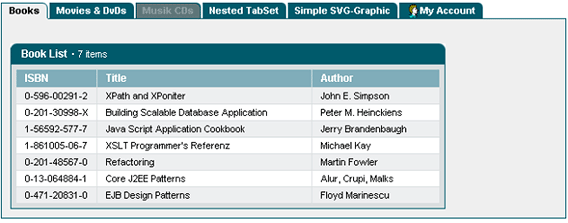
Configuration
- TabSetControl with 6 tabs, of which 6 visible.
- The individual tabs are included as separate JSP pages.
- The third tab was disabled and cannot be selected.
- The attributes runat="server" states that with a click on a tab, a server roundtrip for building the next tab should be carried out.
- Using an ImageMap, an optional image can be displayed on a tab.
<util:imagemap name="im_tabs"> <util:imagemapping rule="user" src="app/images/user/user.gif" width="16" height="16"/></util:imagemap><html:form action="/sample401/tabsetBrowse" method="post"><ctrl:tabset id="man" name="demots" action="sample401/tabsetBrowse" tabs="6" labellength="20" width="650" imagemap="im_tabs" runat="server"> <ctrl:tab id="tab1" title="Books" content="Tab_Page1.jsp" tooltip="Books"/> <ctrl:tab id="tab2" title="Movies & DvDs" content="Tab_Page2.jsp" tooltip="Movies"/> <ctrl:tab id="tab3" title="Musik CDs" content="Tab_Page3.jsp" tooltip="Disabled Tab" enable="false"/> <ctrl:tab id="tab4" title="Nested TabSet" content="Tab_Page4.jsp" tooltip="Demo of a nested TabSet"/> <ctrl:tab id="tab5" title="Simple SVG-Graphic" content="Tab_Page5.jsp" tooltip="SVG-Example"/> <ctrl:tab id="tab6" title="My Account" content="Tab_Page6.jsp" tooltip="My Account" imageref="user"/></ctrl:tabset></html:form>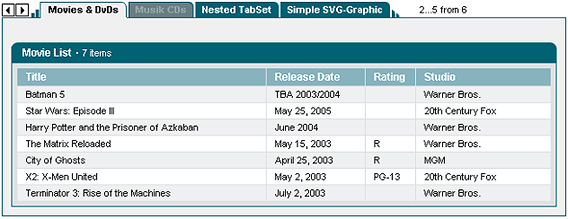
Configuration
- TabSetControl with 6 tabs, of which 4 visible Displayed buttons for client-side scrolling.
- The individual tabs are included as separate JSP pages.
- The third tab was disabled and cannot be selected.
- The attributes runat="server" states that with a click on a tab, a server roundtrip for showing the next tab should be carried out. The tabs are all transferred at the time of the first display of the tabset to the Client. Über DHTML werden die Taben lediglich ein or ausgeblendet.
- The TabSet uses an ImageMap for integrating of images on the individual tabsand an ImageMap.
<util:imagemap name="im_tabs"> <util:imagemapping rule="user" src="app/images/user/user.gif" width="16" height="16"/></util:imagemap><html:form action="/sample401/tabsetBrowse" method="post"><ctrl:tabset id="man" name="demots" action="sample401/tabsetBrowse" tabs="4" labellength="20" width="650" imagemap="im_tabs" runat="client"> <ctrl:tab id="tab1" title="Books" content="Tab_Page1.jsp" tooltip="Books"/> <ctrl:tab id="tab2" title="Movies & DvDs" content="Tab_Page2.jsp" tooltip="Movies"/> <ctrl:tab id="tab3" title="Musik CDs" content="Tab_Page3.jsp" tooltip="Disabled Tab" enable="false"/> <ctrl:tab id="tab4" title="Nested TabSet" content="Tab_Page4.jsp" tooltip="Demo of a nested TabSet"/> <ctrl:tab id="tab5" title="Simple SVG-Graphic" content="Tab_Page5.jsp" tooltip="SVG-Example"/> <ctrl:tab id="tab6" title="My Account" content="Tab_Page6.jsp" tooltip="My Account" imageref="user"/></ctrl:tabset></html:form>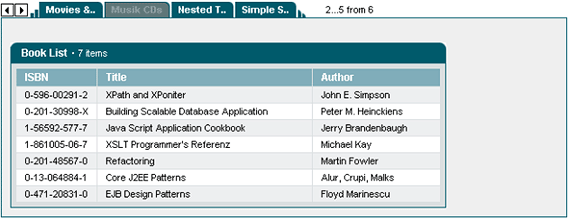
Configuration
- Limiting the length of the labels on the tabs to 8 digits.
- Other settings as in Configuration example 2.
<html:form action="/sample401/tabsetBrowse" method="post"><ctrl:tabset id="man" name="demots" action="sample401/tabsetBrowse" tabs="6" labellength="8" width="650" runat="server">// see Example 2