1What is an API gateway?
An API gateway is a dedicated intermediate layer that sits between the React frontend (SPA) and the actual backend services – several Spring Boot microservices, for example – and bundles all incoming traffic. Instead of the SPA talking directly to one or more Spring services, every request first passes through the gateway, which decides where to forward it.
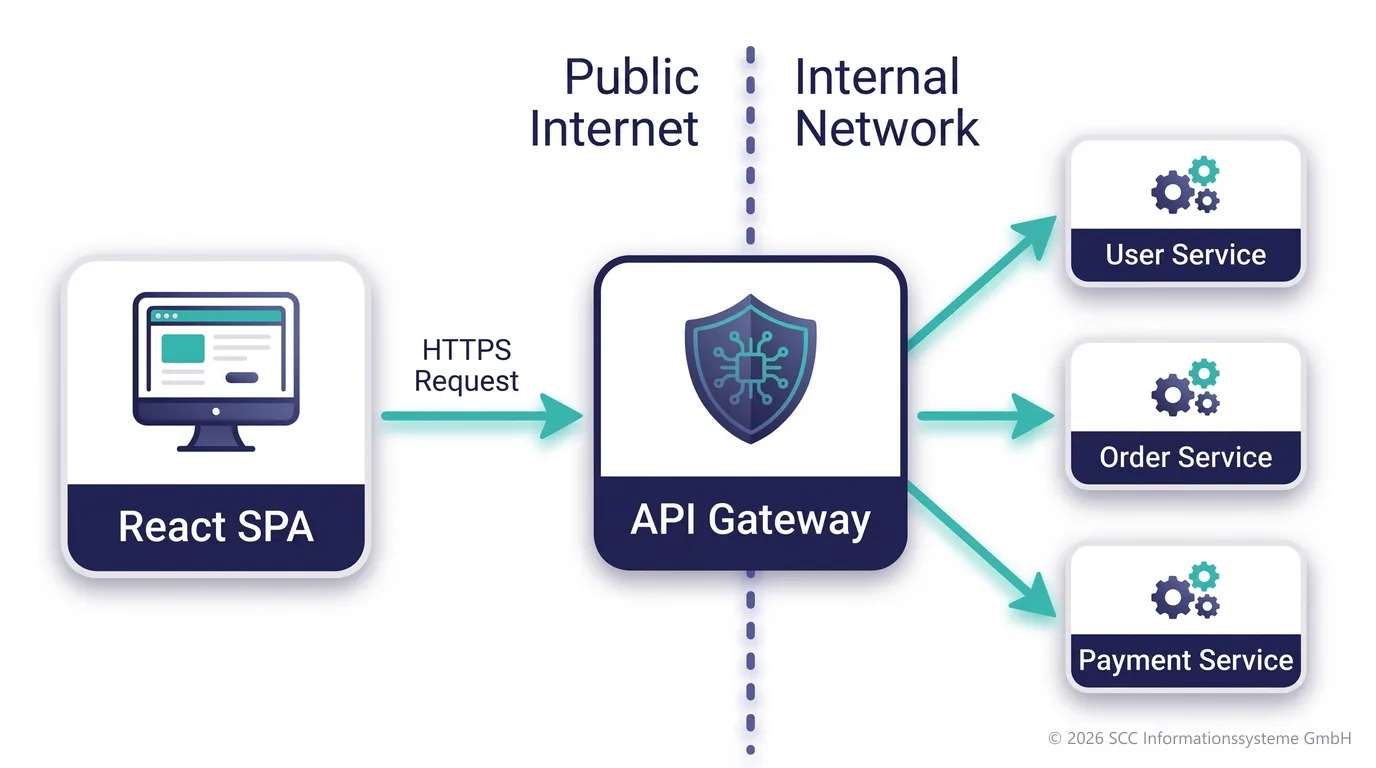
The decoupling has two sides:
Structural: The frontend only knows one stable URL/domain, no matter how many microservices exist behind it, how they are scaled, renamed, versioned or redeployed. The backend can evolve freely without the frontend having to be adapted.
Security-wise: The gateway is the only publicly reachable component, while the backend services sit in an internal network and are never directly reachable from the client.
2What should an API gateway cover?
- Routing & composition — forward requests to the right service based on path, host or header; where needed, aggregate several backend calls into a single response.
- Security / AuthN / AuthZ — central token validation (JWT, OAuth2/OIDC), TLS termination, hiding internal details from the outside.
- CORS handling — central CORS configuration instead of every microservice handling it separately.
- Rate limiting / throttling — protecting the backend services from overload or abuse.
- Request/response transformation — enriching or removing headers, reshaping payloads, mapping API versions (v1/v2).
- Logging, monitoring, tracing — collecting access logs, metrics and correlation IDs for distributed tracing in one place.
- Resilience patterns — circuit breakers, retries, timeouts, fallbacks, so that one failing microservice does not bring down the whole system.
- Caching — buffering rarely changing responses to take load off the backend services.
In the Spring world, Spring Cloud Gateway is usually used for this (reactive, based on Spring WebFlux). Alternatives: Kong, NGINX, Traefik or cloud-native offerings such as AWS API Gateway / Azure API Management.
3Spring Cloud Gateway in detail
A concrete point of reference, because our own gateway was built in TypeScript — here are the key facts about Spring Cloud Gateway for comparison.
Language: framework vs. your own code
Spring Cloud Gateway as a framework/library is itself written in Java. The application code on top of it — routes, filters, security configuration — can be written in Java or Kotlin. Both are JVM languages, compile to bytecode and are fully interoperable. Kotlin has had first-class support since Spring Framework 5 (a routing DSL of its own, null-safety interop, coroutines as an alternative to Reactor chains in WebFlux) and is often preferred for new Spring projects.
Blocking vs. non-blocking
The difference concerns the concurrency model: in the classic (blocking) servlet model every concurrent request occupies a thread of its own, even while that thread is merely waiting for a response from a backend service or a database — with many parallel, long-running requests this quickly becomes a scaling problem (an exhausted thread pool). In the non-blocking model of WebFlux/Netty a thread hands back control while it waits for I/O and can serve other requests in the meantime — a small thread pool is therefore enough for a great many concurrent connections that mostly wait on I/O. For a gateway, whose main job is to accept requests and wait for the response of backend services, this is exactly the right model.
The important point for the comparison with our TypeScript gateway: in principle this model is closer to Node.js than one might think at first glance — both are non-blocking and event-loop based, only on different runtimes (the JVM with Netty/Reactor vs. V8 with the Node event loop). The often-heard comparison “Java is blocking/slower, Node is non-blocking/faster” therefore does not apply here — Spring Cloud Gateway was deliberately built on this non-blocking foundation, precisely because classic Spring MVC (Tomcat, blocking) would be unsuitable for a gateway use case.
Deployment
Spring Cloud Gateway runs as a standalone Spring Boot jar in a Docker image/container of its own — completely separate from the backend service containers. Only the gateway container is exposed to the outside; the backend containers have no public port and are reachable only over the internal container network (service names). Every image is built, versioned and deployed independently.
Comparison with a self-built TypeScript gateway
| Aspect | Spring Cloud Gateway | Self-built TS gateway (Express/Fastify/NestJS) |
|---|---|---|
| Language/runtime | Java or Kotlin on the JVM | TypeScript on Node.js |
| Concurrency | Reactive, non-blocking (WebFlux/Netty) | Non-blocking, event loop (V8) |
| Security (JWT/OIDC) | Largely ready-made (Spring Security OAuth2 client/resource server) | Integrated yourself (e.g. jose/jsonwebtoken plus your own JWKS retrieval) |
| Rate limiting / circuit breaker | Ready-made filters (Resilience4j integration) | Integrated yourself (e.g. express-rate-limit, opossum) |
| Configuration style | Predicates/filters, mostly YAML — configuration instead of code | Middleware code, explicit control |
| Stack consistency with the backend | Identical, if the backend services are Spring Boot too | Two stacks (TS gateway plus Java backend), if the backend is Spring Boot |
| Deployment | A Docker image/container of its own | Likewise a Docker image/container of its own |
In short: Spring Cloud Gateway is “batteries included” and configuration-driven, a self-built TS gateway gives more explicit control but requires you to integrate the individual building blocks yourself.
4Security architecture: who checks what?
The central question is always: who checks what, and where does trust end? Basic principle: token validation at the gateway, business authorisation in the backend.
| Level | Responsibility | Where? |
|---|---|---|
| AuthN (authentication) | Who is the user? Is the token valid? | API gateway |
| AuthZ (authorisation) | May this user perform this business action? | The respective Spring service |
This separation avoids every microservice having to maintain login logic of its own – yet the fine-grained, business-level permission check still happens where the domain logic lives.
5JWT validation at the gateway
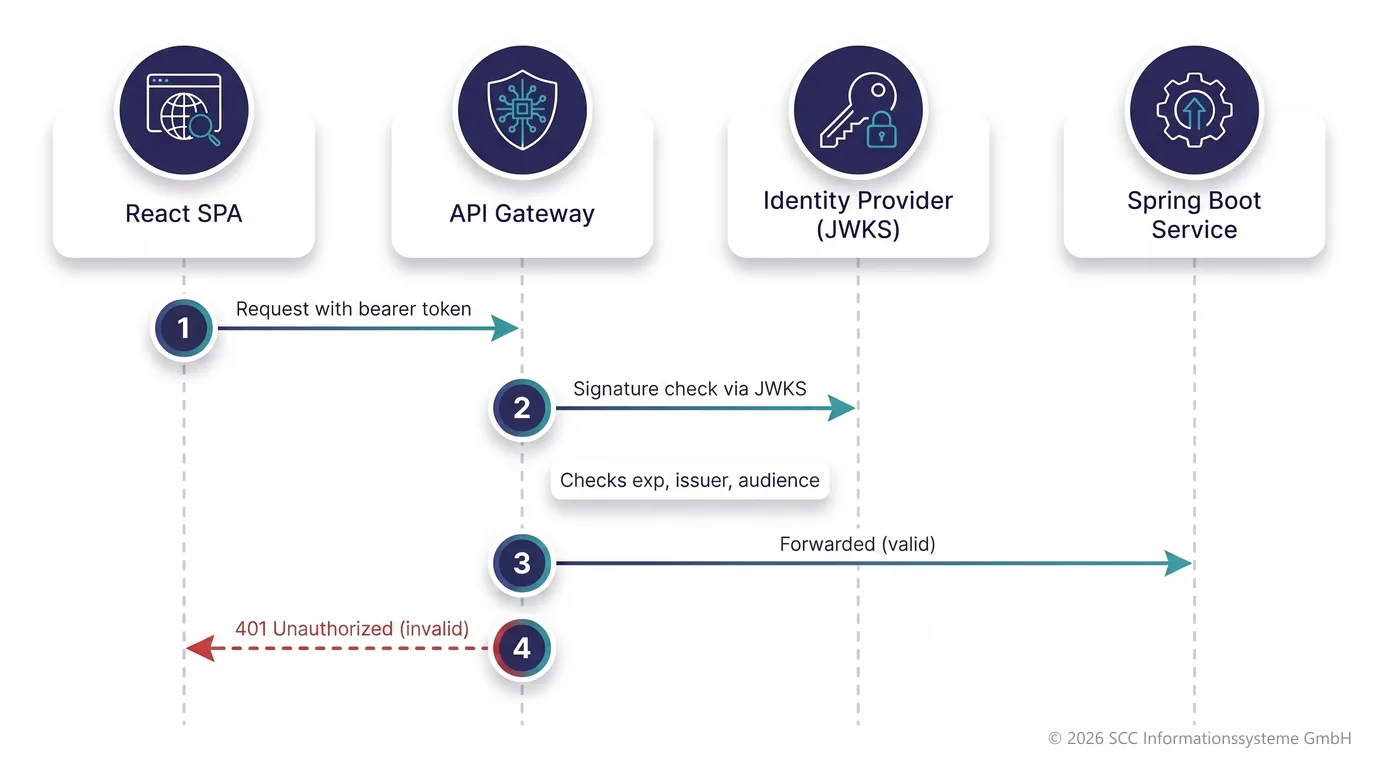
With every request the SPA sends a JWT access token in the Authorization header (bearer token). The gateway validates this token before the request is forwarded at all:
Check the signature against the identity provider’s public keys (JWKS endpoint, e.g. from Keycloak, Auth0, Azure AD B2C), check the expiry (exp), check issuer and audience. If the token is invalid or expired, the gateway blocks the request outright with 401 — the Spring service never sees it.
How does the token reach the backend?
Two common patterns:
| Variant | Description | Trade-off |
|---|---|---|
| Token pass-through | The original JWT is passed on to the service 1:1; the Spring service validates it internally once more (e.g. via spring-boot-starter-oauth2-resource-server). | Simpler, but the sensitive token crosses the internal network. |
| Claims extraction | The gateway extracts user id, roles and tenant and passes them on as internal headers of its own; the original token stays at the gateway. | Safer, but requires trust in the internal network (mTLS / service mesh against header spoofing). |
6Login flow from the SPA
The login runs directly between the SPA and the identity provider (IdP), not through the gateway. The standard for this is the OAuth2/OIDC authorization code flow with PKCE — today’s best practice for SPAs (public clients without a client secret). The earlier implicit flow is considered outdated and insecure.
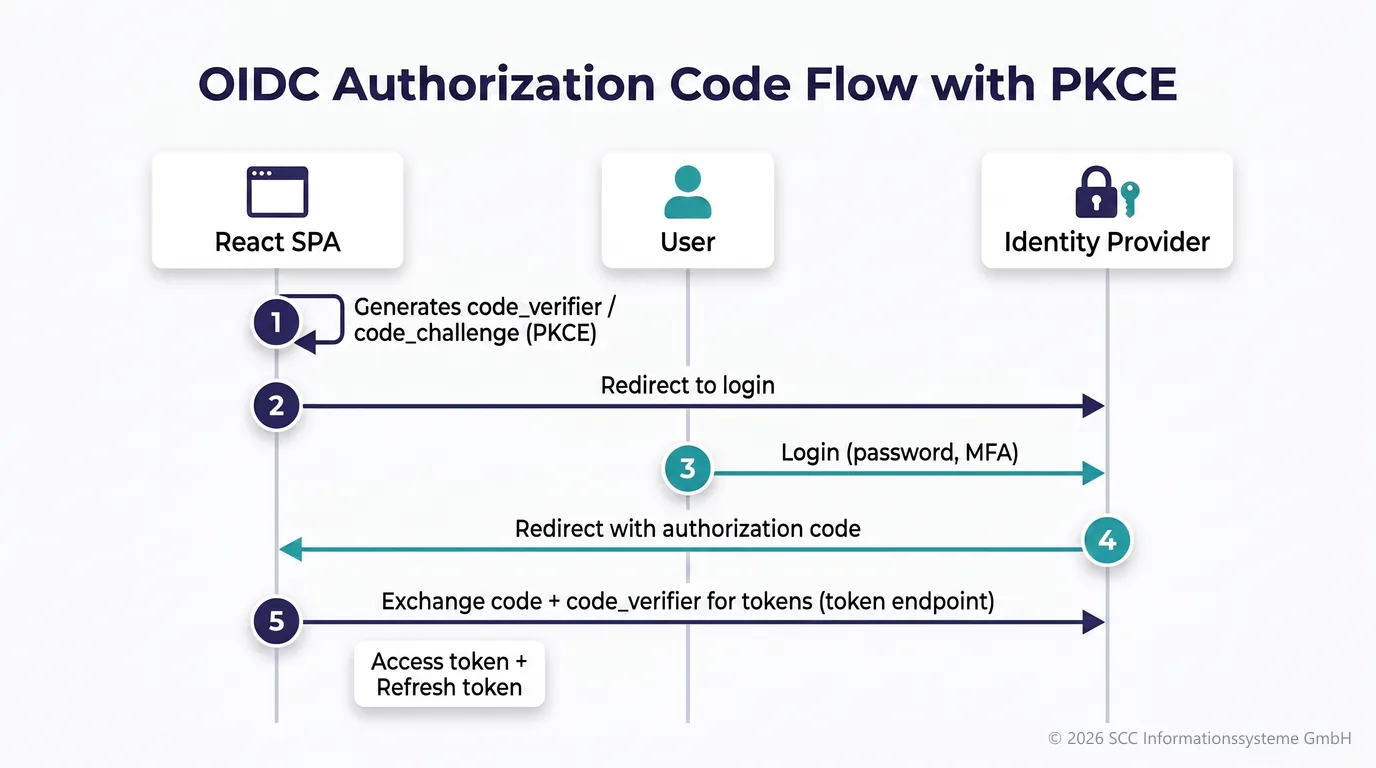
The flow in detail:
1. The SPA dynamically generates a code_verifier/code_challenge pair (PKCE) — this prevents an intercepted authorization code from being redeemed by an attacker.
2. Redirect to the IdP (e.g. the Keycloak login page).
3. The user authenticates (password, MFA if applicable).
4. The IdP redirects back to the SPA’s redirect URI with an authorization code.
5. The SPA exchanges the code plus code_verifier for an access token and a refresh token at the IdP’s token endpoint.
7Token storage & the BFF pattern
The critical question that follows: where does the SPA store the tokens? This is the most delicate point in SPA security.
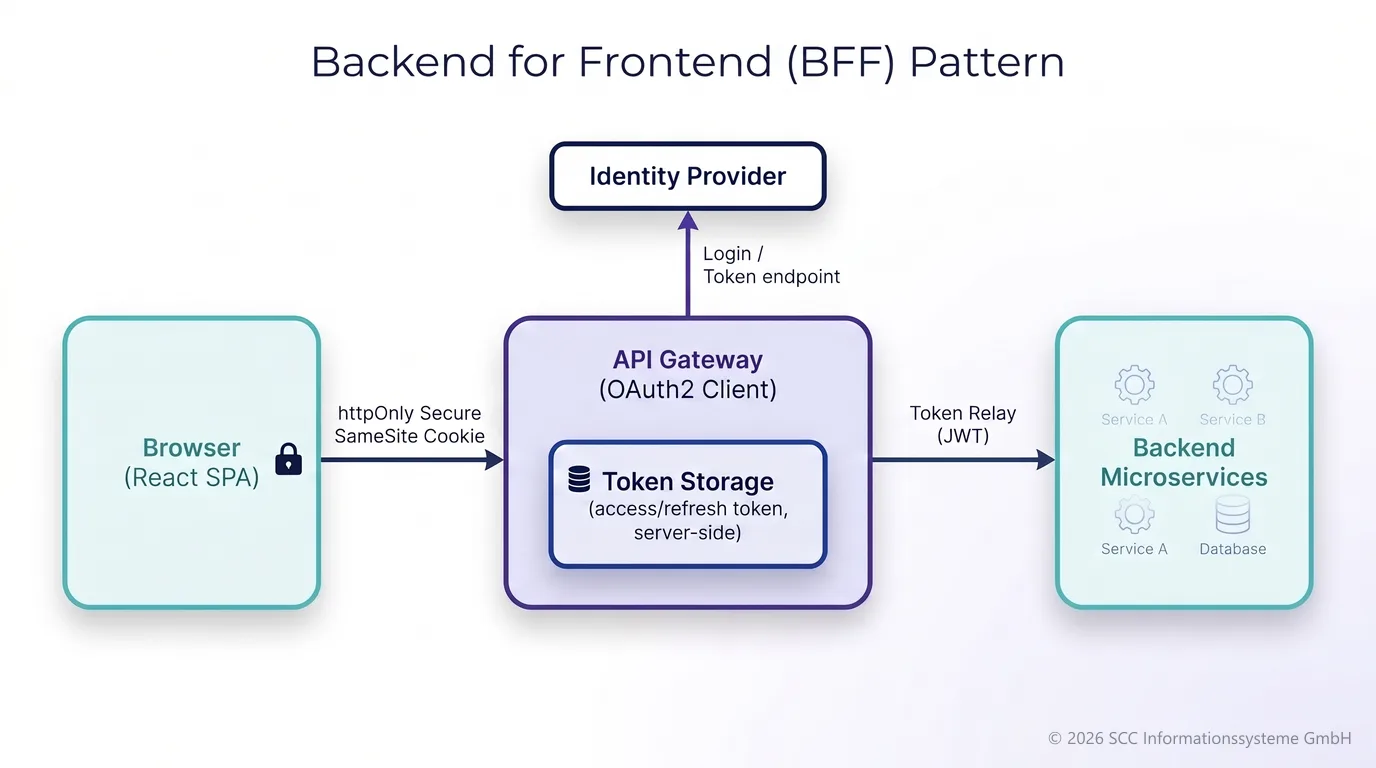
localStorage and sessionStorage are vulnerable to XSS — an injected script can read tokens and exfiltrate them.The approach recommended today is usually BFF-style (backend for frontend): the gateway itself takes on the role of the OAuth2 client (e.g. Spring Cloud Gateway with the TokenRelay filter, i.e. spring-boot-starter-oauth2-client), keeps the tokens server-side and gives the browser only an httpOnly, Secure, SameSite cookie as a session reference. The SPA therefore never has direct access to the JWT in its JavaScript context — the XSS risk drops considerably.
Alternative: tokens directly in the SPA
It is also common to manage the tokens directly in the SPA (e.g. with oidc-client-ts) and to keep them in memory only (not in localStorage), including silent refresh via refresh token rotation. This is considered somewhat riskier and demands more care with the content security policy in order to minimise XSS from the outset.
8BFF pattern: code example with Spring Cloud Gateway
A minimal but complete example for section 7: the gateway itself takes on the role of the OAuth2 client towards Keycloak (or another IdP) — the SPA sees practically nothing of it beyond a cookie.
1. Dependencies
pom.xml<dependency>
<groupId>org.springframework.cloud</groupId>
<artifactId>spring-cloud-starter-gateway</artifactId>
</dependency>
<dependency>
<groupId>org.springframework.boot</groupId>
<artifactId>spring-boot-starter-oauth2-client</artifactId>
</dependency>
<dependency>
<groupId>org.springframework.boot</groupId>
<artifactId>spring-boot-starter-security</artifactId>
</dependency>2. OAuth2 client registration + route with TokenRelay
application.ymlspring:
security:
oauth2:
client:
registration:
keycloak:
client-id: spa-gateway-client
client-secret: ${KEYCLOAK_CLIENT_SECRET}
authorization-grant-type: authorization_code
redirect-uri: "{baseUrl}/login/oauth2/code/keycloak"
scope: openid, profile, email
provider:
keycloak:
issuer-uri: https://idp.example.com/realms/myrealm
cloud:
gateway:
routes:
- id: order-service
uri: http://order-service:8080
predicates:
- Path=/api/orders/**
filters:
- TokenRelay=
server:
reactive:
session:
cookie:
same-site: Lax
http-only: true
secure: trueThe TokenRelay= filter is the actual trick: it takes the access token that Spring Security stored server-side for the user during the OAuth2 login and automatically attaches it as an Authorization: Bearer … header to the request to the backend — without the token ever reaching the browser.
3. Security configuration (reactive, WebFlux)
SecurityConfig.java@Configuration
@EnableWebFluxSecurity
public class SecurityConfig {
@Bean
SecurityWebFilterChain springSecurityFilterChain(ServerHttpSecurity http) {
http
.authorizeExchange(exchanges -> exchanges
.pathMatchers("/login/**", "/oauth2/**").permitAll()
.anyExchange().authenticated())
.oauth2Login(Customizer.withDefaults())
.logout(Customizer.withDefaults());
return http.build();
}
}oauth2Login() automatically brings the necessary endpoints with it — among them /oauth2/authorization/keycloak, which triggers the redirect to the login.
4. What the SPA sees of it
Nothing of OIDC/PKCE — no oidc-client-ts, no token handling in the frontend. If the user is not logged in, the gateway redirects to the login automatically; after that a plain fetch with the cookie is enough:
fetch('/api/orders', { credentials: 'include' })The cookie (the session id) is sent along automatically, the gateway resolves the stored access token from it server-side and attaches it to the backend call.
spring-session-data-redis), so that every gateway instance can reach the same sessions.9CSRF protection with the cookie-based approach
The important point first, because it is often misunderstood: httpOnly protects against XSS, but not against CSRF. httpOnly only prevents JavaScript from reading the cookie value. The browser still attaches the cookie automatically to every request to the gateway domain — regardless of which page triggered that request. That is precisely the CSRF gap: a malicious page (evil.example) can submit a form or a fetch request against your gateway in the background, and the browser sends the valid session cookie along automatically — without the malicious page ever having seen the cookie value.
| Mechanism | Protects against | Enough on its own? |
|---|---|---|
httpOnly | Reading the cookie via JavaScript (XSS) | No — no CSRF protection |
SameSite=Lax/Strict | The cookie being sent along automatically with most cross-site requests | A first line of defence, but not 100 % (edge cases, subdomains, older browsers) |
| CSRF token (double submit) | Forged state-changing requests (POST/PUT/DELETE) | Yes, as defence in depth on top of SameSite |
SameSite as the first line of defence
The example in section 8 already had same-site: Lax in the configuration. Lax ensures that the cookie is not sent with cross-site POST/fetch/XHR requests, but is still sent with ordinary top-level navigation (a link in an e-mail, for instance). Strict blocks that as well — for a pure API/SPA application without classic server-side navigation this is often the safer and equally practical choice.
CSRF token as defence in depth
Because one does not want to rely on a single browser feature alone, the classic addition is an explicit CSRF token check for all state-changing methods (POST, PUT, DELETE, PATCH) — GET/HEAD/OPTIONS count as “safe” (free of side effects) and are exempt. For the WebFlux stack Spring Security brings the cookie-to-header pattern (double submit cookie) ready to use: the server sets an additional cookie named XSRF-TOKEN, deliberately not marked httpOnly, holding a random token value. The frontend reads this cookie value via JavaScript and sends it back with every state-changing request as an X-XSRF-TOKEN header. The server compares the header value with the cookie value — a foreign page cannot set this header, because (unlike the victim itself) it cannot read the cookie value via JavaScript (same-origin policy).
@Bean
SecurityWebFilterChain springSecurityFilterChain(ServerHttpSecurity http) {
    http
        .authorizeExchange(exchanges -> exchanges
            .pathMatchers("/login/**", "/oauth2/**").permitAll()
            .anyExchange().authenticated())
        .oauth2Login(Customizer.withDefaults())
        .csrf(csrf -> csrf
            .csrfTokenRepository(CookieServerCsrfTokenRepository.withHttpOnlyFalse()))
        .logout(Customizer.withDefaults());
    return http.build();
}CsrfToken attribute — otherwise the XSRF-TOKEN cookie is never written to the response, even when the configuration is correct. The usual remedy: a small additional WebFilter that fetches the CsrfToken attribute from the exchange and subscribes to it, so that the cookie is set and renewed with every request.Example on the SPA side
Since React (unlike Angular) does not bring automatic XSRF cookie handling with it, one reads the cookie value manually and attaches it to the header:
function getCookie(name) {
  const match = document.cookie.match(new RegExp('(^| )' + name + '=([^;]+)'));
  return match ? decodeURIComponent(match[2]) : null;
}

fetch('/api/orders', {
  method: 'POST',
  credentials: 'include',
  headers: {
    'Content-Type': 'application/json',
    'X-XSRF-TOKEN': getCookie('XSRF-TOKEN')
  },
  body: JSON.stringify(payload)
});
Alternative: HTTP client libraries such as Axios support this cookie-to-header pattern partly automatically (configured via xsrfCookieName/xsrfHeaderName), which makes the manual read-out code unnecessary.
Brand and product names
The product, company and brand names mentioned in this document — including Spring, Spring Boot, Spring Cloud Gateway, React, Node.js, Keycloak, Auth0, Azure AD B2C, AWS, Kubernetes, Redis, Java, Kotlin, Docker — are trademarks or registered trademarks of their respective rights holders. They are used here solely for illustrative and explanatory purposes; no affiliation, endorsement, or partnership with the respective companies is implied.